Managing screen time: What parents need to know
As a buzz-worthy summer blockbuster movie explores what happens when screens start to replace play, it creates a timely opportunity to discuss how kids are managing screen time in the classroom and at home.
According to the American Academy of Child & Adolescent Psychiatry, children ages 8–18 in the United States average 7 1/2 hours a day using screens, showing how central these devices have become. While screens can entertain, teach and even help children connect, too much use or the wrong kind may lead to problems.
Passive vs. quality screen time
Speaking of screens creating problems, Blue KC Integrated Health Advancement Program Manager Rebekah Adams says to limit passive screen time, which she describes as consuming content rather than actively creating, interacting or engaging with others:
- Mindlessly scrolling social media feeds
- Watching short-form videos
- Using the screen without a purpose or goal
“This is not inherently bad,” Adams said. “It’s where we get entertainment, relaxation and exposure to new ideas or perspectives. It becomes concerning when passive screen time replaces experiences that are critical for healthy development like imaginative play, face-to-face relationships, family interaction and sleep. The problem becomes when you spend many hours consuming media, there are fewer opportunities for these other activities and experiences. That’s where you can have issues like reduced creativity and reduced physical activity. You also have more risk of shortened attention spans.”
How do you make screen time less passive for kids?
“Focus on quality over quantity,” Adams said. “The healthiest screen time is often the kind that sparks a conversation, inspires play or brings people together. For example, educational games that reinforce skills or games like Minecraft where there is an objective that has planning and building.
“It might be better to watch together,” Adams added. “Use it as an opportunity for a conversation starter. Ask, ‘what would you have done?’ or ‘what do you think that character was feeling?’ Engaging with what you are watching creates opportunities for building emotional awareness and communication skills.”
Play time instead of screen time
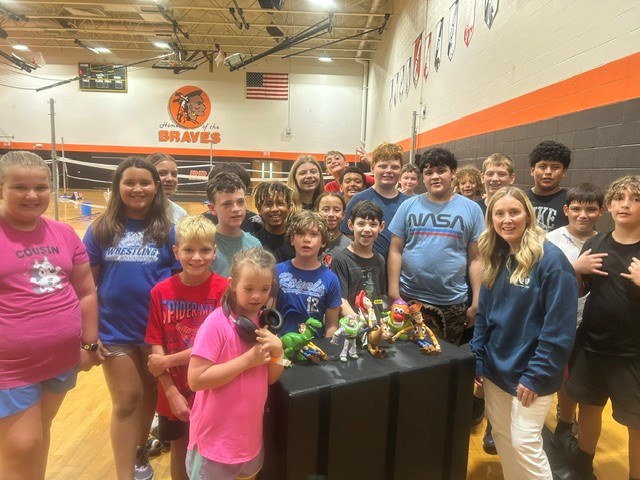
Not every activity has to involve a screen, and local school districts are doing their part. The Bonner Springs-Edwardsville School District provides screen-free activities for first graders through high school students, such as their Summer Strength and Conditioning program. Led by Bonner Springs High School PE Teacher Byron Mays, the program has seen a record-breaking turnout of participating students, who also receive free breakfast and lunch.
“Since I’ve been here, the numbers have grown for the program every year,” Mays said. “I think a lot of that is due to parents and educators wanting the kids to be active, and the children are embracing that. It’s about keeping them engaged and healthy. I see the social engagement that the kids have here in the summertime, and I know how that helps once the school year starts.”
The Blue Valley School District offers screen-free opportunities through Summer Explorations and other in-person enrichment programs that encourage hands-on learning, creativity, social interaction and active engagement.
“Play is so important during the summer because it supports children’s physical health, creativity, social development and overall well-being while not in a formal education setting,” Blue Valley Chief of Academic Services Kelly June said.
Balancing screen time in the classroom
As summer starts to wind down, June offers advice for families to help their children pay less attention to their screen, so they can be prepared to focus on school.
“Set consistent screen-time limits, encourage active play and reading and begin re-establishing school-year routines before classes start. Balance is key to helping students return to school healthy, focused and ready to learn.”
Once they arrive at school, the Blue Valley School District promotes healthy screen time habits in the classroom.
“We actively teach students beginning in elementary and through high school about digital wellness, digital literacy and balance,” June said. “We work with our educators to make good decisions around the use of technology in instruction. Educators are encouraged to only have students use technology when it deepens learning, creates an educational experience that wouldn’t be possible without it or opens the doors to deeper collaboration and creation. We promote a balance with analog activities and an emphasis on them at grades K-2.”
Screen time’s impact on mental health
While quality screen time use can be helpful in building connection, too much screen time use can have the following harmful effects on mental health, according to Adams.
- Increased isolation and loneliness
- Greater exposure to cyberbullying
- Social exclusion at a greater level
- Challenges with social confidence and anxiety
- Sleep disruption, which can affect mood and mental health
Screen time tips from Adams
- Mealtime: This is an important time to be screen free. Build a ritual around sharing your highs and lows of the day.
- Screens out of bedrooms: Before iPads and phones were invented, kids having TVs in their bedrooms was a big deal. Not having screens in the bedroom is an important part of sleep hygiene, especially for kids.
- Technology-free activities: Build in regular screen free activities during weekly routines. Go outside and play a game together!
- Put your phone in another room or get a lock box: This works well if you are struggling to control screen time use yourself.
- Talk about your own screen use with your kids: Tell your child you’re putting your phone down because you want to focus on doing an activity together. Ask older kids what they think about your screen use. Use it as a conversation and start building a family screen time plan.
Screen Sanity
Kansas City nonprofit Screen Sanity helps families and communities pursue digital health. Here are a couple of tips they share to reduce screen time use.
- Establishing built-in spaces for boredom
- It helps foster creativity, process emotions and more. The first few minutes of it can be rough but hang in there. They’ll get over that discomfort and find a way to occupy themselves. You can also have a mantra like “Boredom builds brains” that you can repeat when they inevitably complain.
- Bring screentime to life
- Help your kid extend what they enjoy online, offline. For example, if your kid loves Bluey, encourage them to replicate the make-believe world that Bluey and Bingo created in the latest episode. If your kid loves baking videos, let them pick a recipe online or from a cookbook, make a shopping list and then bake something delicious. Or simply ask them, “How can you bring your screentime to life?” and see what they come up with.
Catch more screen time tips in our interview with Kansas City Mom Collective

Resources
The Blue Valley School District will soon launch a webpage dedicated to this topic where families can learn about the district’s approach with student devices, what technologies are available at each level, data related to student use and tips for families wanting to know more. One of the most valuable resources the district will share is the American Academy of Pediatrics Family Media Plan that walks families through these decisions and putting in place expectations that match their family’s values.
Screen Sanity is offering tech tips inspired by this summer’s buzz-worthy blockbuster movie hit. Here are some more resources they offer for parents to unbundle their tech.
- Parent Night Kit
- One of Screen Sanity’s key programs is their Parent Night Kit, which features a video presentation, discussion questions and printable handouts. It allows anyone, anywhere, to host a conversation about digital wellness.
- Project Landline
- Landlines are making a comeback and provide amazing opportunities for kids to connect screen-free, learn communication skills and so much more. Knowing cultural change stems from collective action, Screen Sanity created Project Landline – a program to help schools/organizations bring landlines to their entire community. Learn more here and stay tuned for the soon-to-be-released Project Landline Playbook.
- Additional Tools
- Screen Sanity also has a variety of tools on their website and shares tips on Instagram & Facebook (@screensanity).